The Silent Killer of WordPress Scalability: Why Performance Breaks Under Concurrent Traffic
A Deep Dive into PHP-FPM, Concurrency, and the 504 Gateway Timeout
We’ve all been there. You build a WordPress site, it scores 99/100 on PageSpeed Insights, and it feels snappy during development. You launch, traffic starts trickling in, and everything is fine.
Then, the marketing campaign hits. Or maybe a viral tweet sends a surge of visitors. Suddenly, your "fast" site slows to a crawl. The admin dashboard becomes unusable. Users start seeing 504 Gateway Timeouts. You check your CPU usage, and weirdly, it might not even be maxed out.
So, what gives?
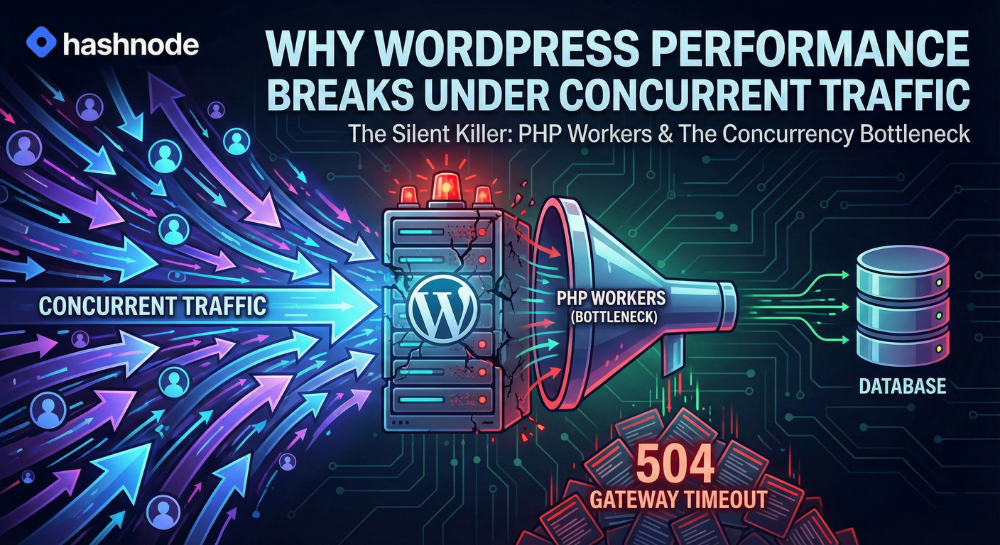
The answer usually isn't "you need a bigger server" (though that’s what most hosts will tell you). The answer lies in the architecture of how WordPress handles requests, specifically, the concurrency bottleneck created by PHP Workers.
In this deep dive, we’re going to look under the hood of the WordPress engine to understand why it chokes under load and how to fix it.
The Architecture: How WordPress Actually Handles a Request
To understand the crash, we have to understand the traffic flow. When a user visits your WordPress site, the request doesn't just hit a "server." It passes through a specific stack, typically looking like this:
Nginx/Apache: The web server receives the HTTP request.
PHP-FPM: The server passes the request to the PHP FastCGI Process Manager.
PHP Worker: A specific worker process accepts the job, executes the PHP code, and builds the page.
MySQL/MariaDB: The worker queries the database for content, settings, and user data.
Response: The worker stitches the HTML together and hands it back to the web server to send to the user.
If you are serving a static HTML file or a fully cached page (via a plugin or Varnish), steps 2 through 4 are skipped entirely. Nginx just hands over the file. This is why static sites can handle millions of hits.
But for dynamic requests carts, checkouts, logged-in user dashboards, or search results WordPress must execute PHP. And this is where the bottleneck exists.
The Bottleneck: PHP Workers
Here is the golden rule of WordPress concurrency: One PHP Worker can handle only one request at a time.
Unlike Node.js, which is non-blocking and event-driven, PHP is synchronous. If a worker picks up a request that takes 500ms to process, that worker is effectively "locked" for that half-second. It cannot touch anything else.
The "Checkout Lane" Analogy
Imagine your server is a grocery store.
The Visitors: Shoppers trying to check out.
The PHP Workers: The cashiers.
The CPU Speed: How fast the cashier can scan items.
If you have 4 PHP Workers (a common default on smaller hosting plans), you have 4 open lanes.
If 4 shoppers arrive at the exact same second, all 4 get served immediately.
But what happens if 5 shoppers arrive?
The first 4 get a cashier. The 5th shopper has to stand in line (the queue).
Now, imagine a "concurrent traffic" spike. 50 shoppers arrive at once.
4 are being served.
46 are in the queue.
If the cashier takes 1 second to process a customer, the person at the back of the line is waiting over 10 seconds just to start their transaction. In the web world, the browser gives up waiting and throws a 504 Gateway Timeout. The store hasn't burned down (the server didn't crash), but the customers are leaving because the line isn't moving.
For a deeper technical breakdown on how these workers limit your speed, check out this guide on PHP Workers and Site Speed, which explains the mechanics of this queuing disaster in detail.
Why "More CPU" Isn't Always the Answer
A common mistake developers make is confusing Throughput (Speed) with Concurrency (Capacity).
When your site crashes, you might upgrade from a 2-Core server to a 4-Core server. This makes the CPU faster. In our grocery store analogy, you just gave the cashiers quicker scanners. Maybe they can scan a cart in 0.8 seconds instead of 1.0 seconds.
That helps! But if you still only have 4 cashiers (Workers), you are still limited to processing 4 requests simultaneously. You haven't widened the highway; you just increased the speed limit slightly. To handle concurrent traffic, you don't just need faster workers; you need more of them.
The Database: The Anchor Dragging You Down
If PHP Workers are the bottleneck, the Database is often the reason they are moving slowly.
Remember, a PHP Worker is "locked" while it waits for the database. If your WooCommerce checkout page runs a slow SQL query that takes 3 seconds to retrieve shipping rates, that PHP Worker is doing nothing for 3 seconds but waiting. It’s blocked.
If you have 10 workers and a slow database query hits all of them:
10 users click "Checkout".
10 workers pick up the tasks.
All 10 workers hit the slow query and wait 3 seconds.
Concurrency is now 0. No one else can access the site for 3 seconds.
This is why unoptimized plugins are lethal. A plugin that runs a heavy SELECT * query on every page load essentially holds your PHP workers hostage, drastically reducing the number of concurrent users your server can support.
Real-World Scenarios That Break Performance
It’s important to identify when this breakage happens. It usually isn't on your "About Us" page.
1. The WooCommerce Cart & Checkout
These pages are uncacheable. You cannot cache the checkout page because it contains specific user data. Every single visitor hitting /checkout/ consumes a PHP Worker. If your marketing email links directly to a checkout flow, you are DDoS-ing yourself.
2. The Admin Dashboard
Ever notice how the /wp-admin/ area gets sluggish when you have high traffic? That's because admin pages are dynamic. If your frontend traffic is eating up all the PHP workers, there are none left for you to log in and disable the plugin causing the issue.
3. Search Queries
WordPress default search is database-heavy and uncacheable. A bot spamming your search bar can tie up all your workers in milliseconds.
How to Fix It: A Developer's Strategy
So, how do we solve this? We attack the problem from two angles: reducing the load on workers, and increasing the capacity of workers.
1. Aggressive Caching (The Defense)
The best way to save a PHP Worker is to never use it.
Page Caching: Use tools like Redis, Varnish, or plugins like WP Rocket. If a page is cached, Nginx serves it. The PHP Worker stays asleep. This allows you to handle thousands of concurrent visitors on the homepage with zero load.
Object Caching: For dynamic requests that must use PHP, use Redis or Memcached. Instead of querying MySQL every time for
get_option('site_url'), PHP grabs it from RAM. This reduces the time the worker is "locked," freeing it up faster for the next user.
2. Increase PHP Workers (The Offense)
You need to tune your pm.max_children setting in PHP-FPM.
The Limit: You can't just set this to 1000. Each worker consumes RAM (usually 60MB–100MB per process).
The Math: If you have 4GB of RAM reserved for PHP, and each worker takes 100MB, you can roughly support ~40 workers.
The Config:
Ini, TOML
; /etc/php/8.1/fpm/pool.d/www.conf

pm = dynamic
pm.max_children = 50  ; Maximum concurrent requests
pm.start_servers = 10
pm.min_spare_servers = 5
pm.max_spare_servers = 15
Note: If you increase this number beyond your RAM capacity, your server will start swapping to disk, and the site will crash hard. Measure twice, cut once.
3. Offload Background Processes
Don't let your users wait for things that can happen later.
Sending emails? Use an external service (SendGrid, Mailgun) and queue them.
Generating PDF invoices? Do it via a cron job, not on the "Thank You" page load.
WP-Cron? Disable the default
wp-cron.php(which runs on page loads) and set up a real system cron on the server. This stops a random visitor from getting stuck waiting for your backups to run.
Conclusion
WordPress isn't inherently slow, but its synchronous nature requires a specific architectural approach when scaling. The "concurrent traffic" problem is almost always a math problem: (Traffic Volume) > (PHP Workers / Request Duration).
To win, you lower the Request Duration (optimization/database tuning) and increase the PHP Workers (server resources).
If you are currently debugging a slow site, stop looking at the bandwidth graph and start looking at your PHP-FPM Active Processes metric. That is where the battle for performance is won or lost.
About the author
Blogger, Developer
Comments
Join the discussionNo comments yet. Be the first to comment.